In this blog post I will share my experience with building a native Raycast extension for repository management, which is one of my "daily drivers" on my Mac to improve my productivity and efficiency. Note there are endless possibilities and you can build anything you can imagine with Raycast.
In the past I was juggling between multiple repositories across different directories and various subdirectories like which cloned into a specific project directory. At some point I needed a fast way to open projects in Cursor. My initial solution was a shell script using AppleScript dialogs, but it had annoying issues:
- Focus problems - dialogs appeared in the background
- Requires mouse - couldn't navigate with keyboard only
- Not native - felt clunky and out of place
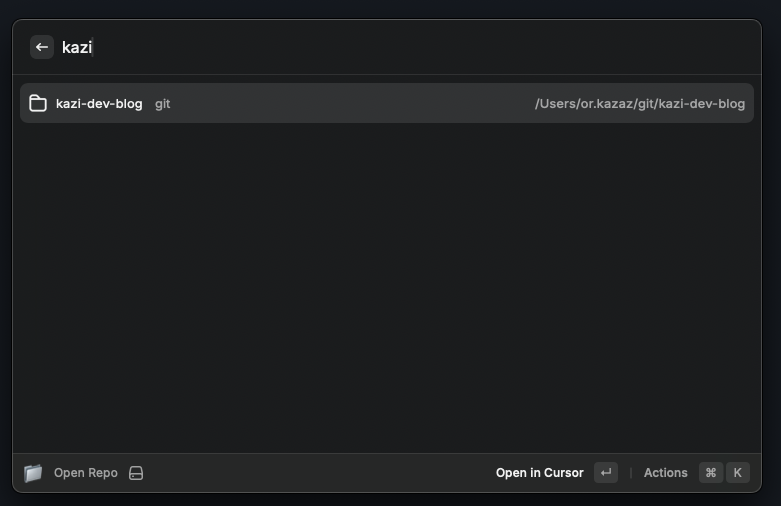
Therefore, the solution was to build a native Raycast extension that provides:
- Repo discovery - discover repositories across different directories and subdirectories
- Repo focus - always appears where Raycast is
- Keyboard-first - arrow keys + Enter to select
- Live filtering - type to search repositories instantly
- Multiple actions - open in Cursor, Finder, Terminal, or copy path
- Native feel - looks and behaves like built-in Raycast commands
So let's show an example of how to do this.
Create a new directory and initialize the project:
mkdir my-repo-extension
cd my-repo-extension
npm init -y
npm install @raycast/api
Create package.json with the Raycast extension schema:
{
  "$schema": "https://www.raycast.com/schemas/extension.json",
  "name": "repository-opener",
  "title": "Repository Opener",
  "description": "Open repositories from ~/work and ~/git directories in Cursor", // these are the directories you want to scan for repositories
  "icon": "📁",
  "author": "your-name",
  "categories": ["Developer Tools"],
  "commands": [
    {
      "name": "list-repos",
      "title": "Open Repo",
      "subtitle": "Repository Opener",
      "description": "List and open repositories",
      "mode": "view",
      "keywords": ["repo", "repository"]
    }
  ],
  "dependencies": {
    "@raycast/api": "^1.62.0"
  },
  "scripts": {
    "build": "ray build -e dist",
    "dev": "ray develop"
  }
}
Create src/list-repos.jsx:
import {
  List,
  ActionPanel,
  Action,
  showToast,
  Toast,
  Icon,
} from "@raycast/api";
import { execSync } from "child_process";
import { useState, useEffect } from "react";
import path from "path";
import os from "os";

function getRepositories() {
  const homeDir = os.homedir();
  const allRepos = [];

  // Scan main directories
  const mainDirs = [
    path.join(homeDir, "work"),
    path.join(homeDir, "git") // these are the directories you want to scan for repositories
  ];

  for (const dir of mainDirs) {
    try {
      const output = execSync(
        \`find "\${dir}" -maxdepth 1 -mindepth 1 -type d 2>/dev/null\`,
        { encoding: "utf8" }
      );
      const repos = output.split("\\n").filter(Boolean);

      for (const repoPath of repos) {
        const repoName = path.basename(repoPath);
        const parentDir = path.basename(path.dirname(repoPath));
        allRepos.push({
          name: repoName,
          path: repoPath.trim(),
          parent: parentDir,
        });
      }
    } catch (error) {
      // Skip if directory doesn't exist
    }
  }

  // Also scan subdirectories (myproject, myproject2, etc.)
  const subDirs = [
    path.join(homeDir, "work", "myproject"),
    path.join(homeDir, "git", "myproject2"),
    path.join(homeDir, "work", "myproject"),
    path.join(homeDir, "git", "myproject2"),
  ];

  for (const dir of subDirs) {
    try {
      const output = execSync(
        \`find "\${dir}" -maxdepth 1 -mindepth 1 -type d 2>/dev/null\`,
        { encoding: "utf8" }
      );
      const repos = output.split("\\n").filter(Boolean);

      for (const repoPath of repos) {
        const repoName = path.basename(repoPath);
        const grandParent = path.basename(path.dirname(path.dirname(repoPath)));
        const parent = path.basename(path.dirname(repoPath));
        allRepos.push({
          name: repoName,
          path: repoPath.trim(),
          parent: \`\${grandParent}/\${parent}\`,
        });
      }
    } catch (error) {
      // Skip if directory doesn't exist
    }
  }

  // Remove duplicates and sort
  const uniqueRepos = allRepos.filter(
    (repo, index, self) => index === self.findIndex((r) => r.path === repo.path)
  );

  return uniqueRepos.sort((a, b) => a.name.localeCompare(b.name));
}

async function openInCursor(repoPath, repoName) {
  try {
    const cursorPaths = ["/usr/local/bin/cursor", "/opt/homebrew/bin/cursor"];

    let cursorCommand = null;
    for (const cursorPath of cursorPaths) {
      try {
        execSync(\`test -x "\${cursorPath}"\`, { stdio: "ignore" });
        cursorCommand = cursorPath;
        break;
      } catch (error) {
        continue;
      }
    }

    if (cursorCommand) {
      execSync(\`"\${cursorCommand}" "\${repoPath}"\`, { stdio: "ignore" });
    } else {
      execSync(\`open -a "Cursor" "\${repoPath}"\`, { stdio: "ignore" });
    }

    showToast(Toast.Style.Success, "Success", \`Opening \${repoName} in Cursor\`);
  } catch (error) {
    showToast(Toast.Style.Failure, "Error", "Failed to open repository");
  }
}

export default function Command() {
  const [repositories, setRepositories] = useState([]);
  const [isLoading, setIsLoading] = useState(true);

  useEffect(() => {
    const fetchRepos = async () => {
      setIsLoading(true);
      const repos = getRepositories();
      setRepositories(repos);
      setIsLoading(false);
    };

    fetchRepos();
  }, []);

  return (
    <List isLoading={isLoading} searchBarPlaceholder="Search repositories...">
      {repositories.map((repo) => (
        <List.Item
          key={repo.path}
          title={repo.name}
          subtitle={repo.parent}
          accessories={[{ text: repo.path }]}
          icon={Icon.Folder}
          actions={
            <ActionPanel>
              <Action
                title="Open in Cursor"
                icon={Icon.Code}
                onAction={() => openInCursor(repo.path, repo.name)}
                closeOnAction={true}
              />
              <Action.Open
                title="Open in Finder"
                target={repo.path}
                application="Finder"
                icon={Icon.Finder}
              />
              <Action.CopyToClipboard
                title="Copy Path"
                content={repo.path}
                icon={Icon.CopyClipboard}
              />
              <Action.Open
                title="Open in Terminal"
                target={repo.path}
                application="Terminal"
                icon={Icon.Terminal}
              />
            </ActionPanel>
          }
        />
      ))}
    </List>
  );
}
Now build the extension and add it to Raycast:
npm run build

# Add to Raycast
# Open Raycast Settings > Extensions > Add Local Extension
# Select your project folder
- Open Raycast (Cmd + Space)
- Type "repo" to find your command
- Start typing to filter repositories
- Press Enter to open in Cursor
- Raycast automatically closes!
The script extension will have the following features:
Smart Repository Discovery
The extension scans multiple directory patterns:
~/work/*and~/git/*for main repositories~/work/myproject/*for project subdirectories- Easy to extend for your own directory structure
⌨️ Keyboard-First Navigation
- Type to filter repositories instantly
- Arrow keys to navigate
- Enter to open (primary action)
- Tab to see secondary actions
🎯 Multiple Actions
Each repository offers several actions:
- Open in Cursor (primary) - opens the project
- Open in Finder - for file browsing
- Copy Path - quick path copying
- Open in Terminal - launch terminal in repo
🚀 Auto-Close Behavior
The closeOnAction={true} prop makes Raycast disappear after opening a repository, creating a smooth workflow.
What else i'm going to leverage using Raycast?
- Project Templates - Create new projects from templates
- Environment Manager - Switch between development environments and more...
Have you built any cool Raycast extensions? Please share them with me!