Over the past few months, my terminal workflow has completely transformed multiple times. Turns out running multiple agents quickly turned into a management challenge. I found myself juggling dozens of terminal tabs, trying out new tools, losing track of which agent was waiting for permission, and constantly losing progress whenever my laptop went to sleep or my SSH session dropped.
Then I found Herdr (herdr.dev), and it completely solved the problem.
Here is why Herdr has become my indispensable setup for running AI agents, how it works under the hood, and how I configured it to fit my daily development environment.
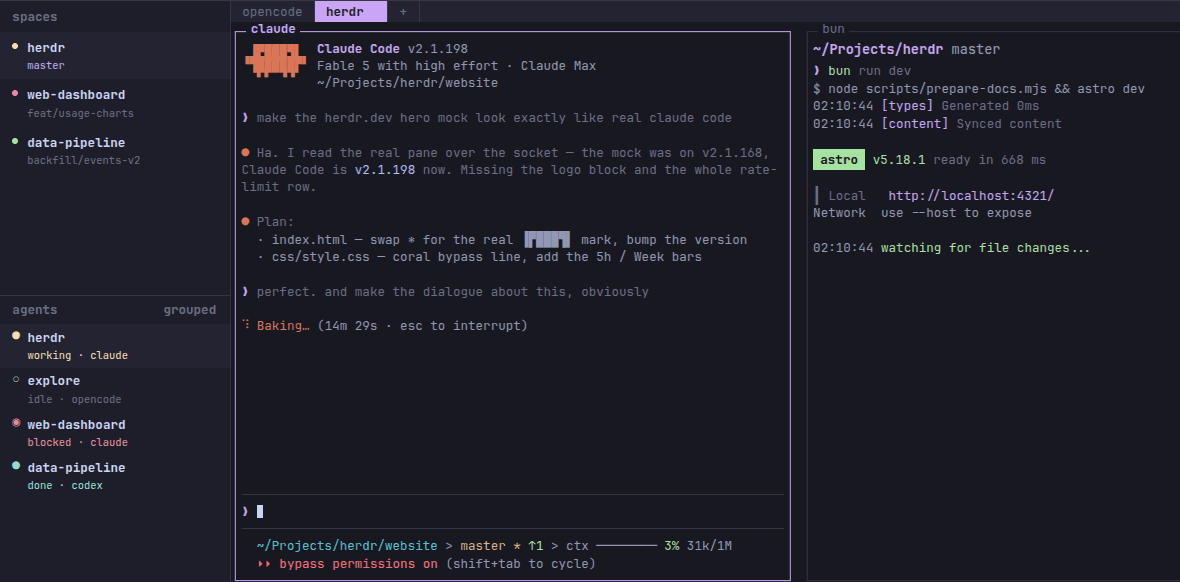
Herdr is the persistent runtime and multiplexer where those agents live. Think of Herdr as a modern, agent-native replacement for tmux. It owns the terminal sessions where your agents run, providing a unified background daemon, a nicer Terminal User Interface (TUI), and real-time process monitoring.
When you launch Claude Code in a regular terminal tab, that process is attached to your active terminal emulator and shell session. If you close your laptop lid, drop your Wi-Fi connection, or close the window, the terminal process receives a hangup signal (SIGHUP), and your agent dies midway through a task.
Herdr fixes this by decoupling the process lifecycle from your terminal GUI using a client-server daemon architecture:
- Persistent Background Daemon
Herdr runs as a background server process (herdr-server) that owns your pseudo-terminals (PTYs). When you open Herdr in your terminal, you are simply attaching a lightweight TUI client to that server. If you close your terminal, disconnect your Wi-Fi, or switch machines, the daemon keeps working. When you open Herdr again—even over SSH from another computer—your entire session, split panes, and agent logs are exactly where you left them.
- Native Agent State Hooking
Standard terminal multiplexers like tmux treat terminal panes as dumb text buffers. Herdr is agent-native. By installing light integration hooks (e.g., herdr integration install claude), Herdr directly listens to the agent’s socket and PTY stream. It parses the agent's real-time state and displays it clearly in the sidebar:
Working: The agent is actively generating code or executing shell tools.
Blocked: The agent is waiting for human input, confirmation, or permission bypass.
Idle / Done: The agent finished its job and is waiting for its next prompt.
You never have to click through tabs to see who is waiting on you—the sidebar flags blocked agents instantly.
To get the most out of Herdr, I paired it with Ghostty, a GPU-accelerated terminal emulator with sub-millisecond rendering and native 24-bit color support.
Also, by default, Herdr uses tmux-style prefix shortcuts based on Ctrl+B (e.g., Ctrl+B then v to split panes, Ctrl+B then w to switch spaces), which for some people that might be a spot on descion. However, I wanted to avoid the extra keystroke and have direct single-keypress navigation without hitting a prefix key first. Herdr makes this easy through its ~/.config/herdr/config.toml configuration file.
I quickly cosumized my Herdr config to have direct shortcuts for switching between spaces, creating new spaces, renaming spaces, and reloading the configuration and more. The thing with Herder, altough it defines itself as mouse native, I found my self using the mouse less and less, and instead relying on keyboard shortcuts to navigate between spaces and panes. This is especially useful when I have multiple agents running in different spaces, as I can quickly switch between them without losing focus on my current task.
I found my self controlling multiple agent sessions with ease, and I could even run multiple agents in the same space without losing track of their state. The sidebar was a game-changer for me, as I could see all my agents at a glance and quickly identify which ones needed my attention. In addition to that, if I shut down my laptop at the end of the day, everything keeps running on the local daemon. When I boot up the next morning, my tests are finished, the agents are done, and my terminal layout is intact.
If you are running coding agents daily, stop running them in loose terminal tabs. Give Herdr a try—it's the missing runtime environment coding agents desperately needed.
PS: I'm using it both on MacOS and Linux (Fedora), and it works flawlessly on both platforms.